PaperGuard for iPhone

Scan it. Lock it. It never leaves your phone.

A document scanner that reads, sorts and protects your paperwork entirely on your device. There is no upload, no account to create, and nothing to sign in to — PaperGuard works the same on a plane as it does at home.

iPhone app · Coming soon

The PaperGuard mark: a folded sheet of paper with a keyhole cut into it

A scanner, a reader, and a filing cabinet.

Six things PaperGuard does well — and every one of them runs on the phone in your hand, using Apple's own on-device frameworks.

Point the camera. It finds the page.

VisionKit detects the edges of a document, corrects the perspective and captures the moment the frame is steady. Multi-page contracts come out as one document, in order.

When you'd rather do it yourself, the manual batch camera lets you shoot a stack of pages one after another and review them before saving.

  • Automatic edge detection and perspective correction
  • Multi-page documents in a single capture session
  • Manual batch mode for receipts, forms and odd shapes
On-device OCR

Every word, recognized locally

Apple's Vision framework reads the text on each page as soon as it is scanned, so a photographed invoice becomes searchable text. Nothing is sent anywhere to be transcribed — the recognition happens on the device, offline, in the moment.

Free shows a three-line preview of the recognized text. Pro unlocks the full text and search across it.

Document intelligence

It knows what it just read

PaperGuard classifies the document type and pulls out the details that matter — amounts, dates, and the fields you would otherwise retype by hand.

Folders, tags, favorites

A library that stays tidy: nest documents in folders, tag them across categories, and star the handful you reach for often.

Spotlight search is opt-in. Even when it is on, recognized text from ID cards and passports is never handed to the system index.

Annotate and sign

Mark up a page with PencilKit, then drop in a saved signature. Sign a form and send it back without printing anything.

Export as PDF

Share a clean, multi-page PDF anywhere iOS can send a file. No watermark — not even on the free tier.


Behind Face ID, and nowhere else.

Passports, contracts, medical letters — the documents you scan are the ones you would least like to see uploaded. PaperGuard's Face ID Vault keeps the sensitive ones locked behind biometric authentication, on the device, where they were created.

  • No accounts and no sign-in — there is nothing to log into
  • No analytics, no ads, no third-party tracking SDKs
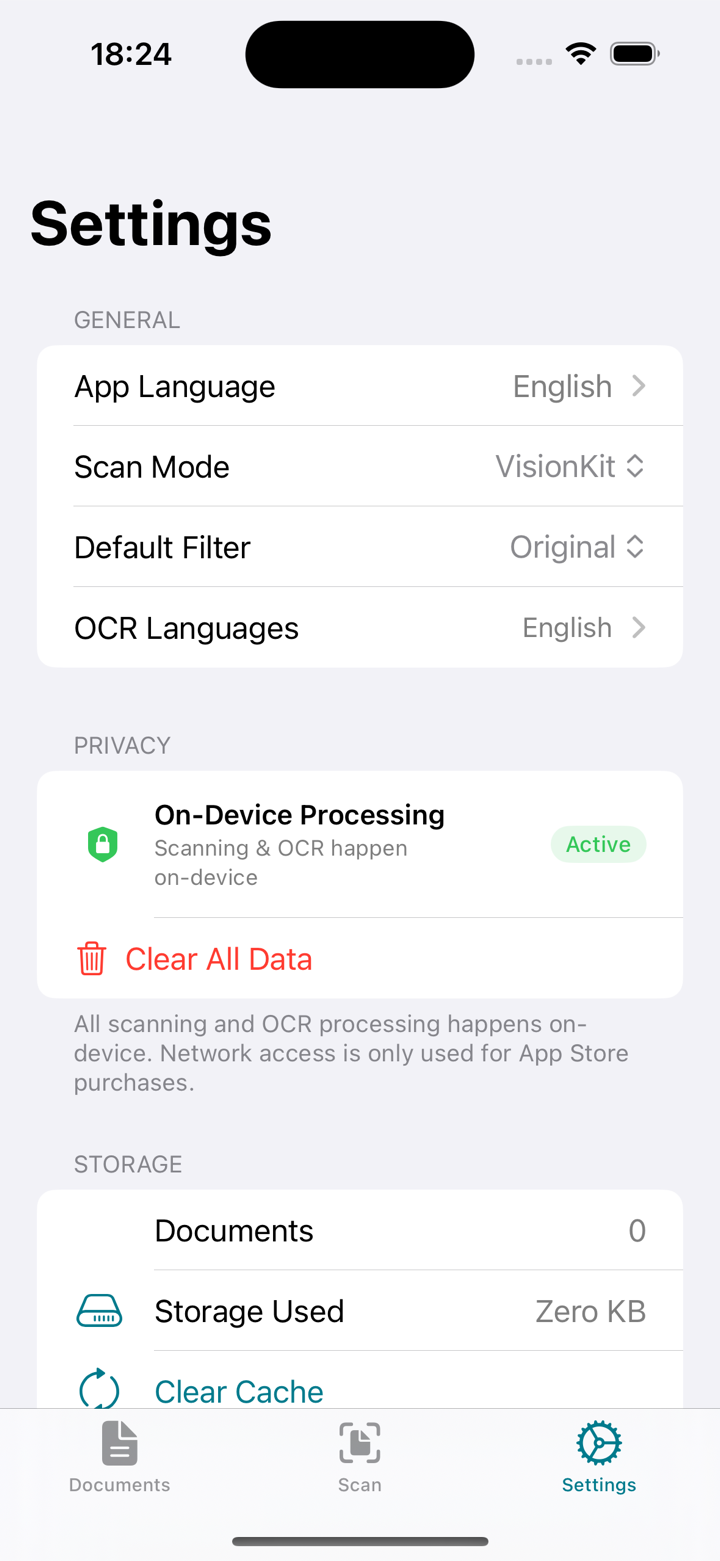
  • No cloud upload: scans, OCR and analysis all run locally
  • The network is used only to process App Store purchases
  • App Store privacy label: Data Not Collected
PaperGuard settings showing a Privacy section with on-device processing marked active and a Clear All Data option

Free is genuinely usable. Pro is for volume.

Scanning and PDF export are never limited or watermarked. Pro exists for people with a lot of paper to read, search and file.

Free

No cost, no account

  • Unlimited scanning
  • PDF export with no watermark
  • OCR preview — the first three lines of each document
  • Annotations and one saved signature
  • One folder and three tags

Pro

$14.99 per year · after a 7-day free trial, or $2.99 per month

  • Everything in Free
  • Full recognized text, plus search across all of it
  • Document intelligence: type, amounts and dates
  • Unlimited folders and tags
  • Unlimited saved signatures

Purchases are handled by the App Store. Cancel anytime.

← BYTE CHIMERA